Chapter 10b
Host CLI (b0rd)
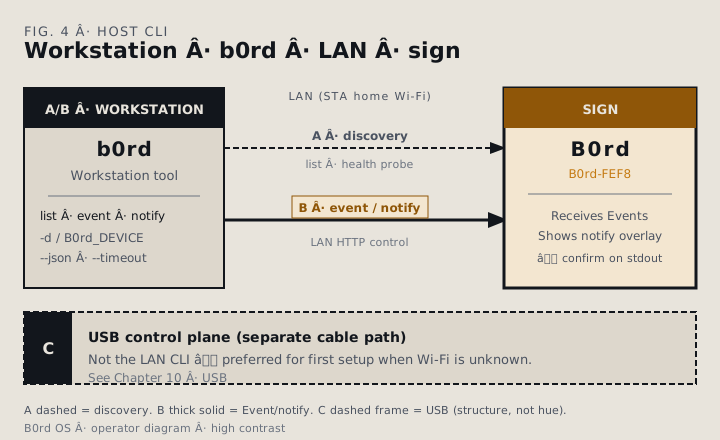
The b0rd workstation tool discovers signs on your LAN and posts product Events — including notification overlays — over the LAN HTTP control path. Use it when the sign is already on home Wi‑Fi and you prefer a terminal over USB. USB remains the sure path when Wi‑Fi is missing or wrong; seeUSB control plane.
Install
Obtain the b0rd workstation tool from your organization’s product release or distribution channel. Place the binary on your PATH, then confirm it runs:
b0rd --helpSource builds and developer packaging stay with your internal release process — not this operator manual.
Commands
| Command | What it does |
|---|---|
b0rd list [--json] [--timeout <secs>] | Discover signs on the LAN (human table or JSON) |
b0rd event <NAME> [--scalar <u16>] [-d|--device <REF>] | Post a product Event to a sign |
b0rd notify <TITLE> [<BODY>] [--duration-ms <ms>] [-d|--device <REF>] | Show a notification overlay (posts a notify Event) |
b0rd notify clear [-d|--device <REF>] | Clear the current notification overlay |
List — discovery
b0rd list probes the LAN for reachable signs (health fingerprints) and prints a table: identity, hostname, version, IP, scene, status, reachable. With no signs found it still succeeds and prints:
No B0rd signs on this network.
Know the address? Use `-d <ref>` or set B0rd_DEVICE.--json— machine-readable inventory for scripts and automation. With no signs found, stdout is[]and the command still succeeds.--timeout <secs>— discovery wait (default5).
b0rd list
b0rd list --json
b0rd list --timeout 2
Event
b0rd event posts a named product Event over the LAN HTTP control path. Optional --scalar supplies a numeric payload when the Event expects one.
b0rd event scene.idle_clock.ripple
b0rd event effect.ring.pulse --scalar 8 -d B0rd-FEF8
On success, stdout prints a one-line confirmation:
B0rd-FEF8 ← scene.idle_clock.rippleNotify
b0rd notify is sugar for notification Events on the same LAN HTTP control path as event — title, optional body, optional timed dismiss. Clear dismisses the overlay. Overlay behavior matchesNotifications.
b0rd notify "Hello" "World" --duration-ms 5000 -d b0rd-fef8
# → B0rd-FEF8 ← notify.show "Hello"

b0rd notify clear -d b0rd-fef8
# → B0rd-FEF8 ← notify.clear
Device selection
Target a sign with -d / --device, or set theB0rd_DEVICE environment variable. Accepted refs:
- SoftAP id —
B0rd-FEF8 - Hostname —
b0rd-fef8 - IP address —
192.168.1.115 - LAN name —
b0rd-fef8.local
Selection rules for event and notify:
- 0 reachable devices → error (needs a ref or a live sign).
- 1 reachable device → auto-selected.
- Many → require
-dorB0rd_DEVICE(no silent pick).
Selection and device-resolution failures exit with code 3(no devices, ambiguous many, or ref not found).
When a device ref is set, discovery probes that ref only (subnet scan skipped).list without a ref scans the local subnet; with a ref it probes that target. See Networking modes for SoftAP, STA, and .local.
export B0rd_DEVICE=b0rd-fef8
b0rd event scene.idle_clock.ripple
b0rd notify "Launch" -d 192.168.1.115
Channel
--channel is a root flag: it must appearbefore the subcommand. Default is http (LAN HTTP, cleartext — trusted LANs only); you can omit the flag.
| Channel | list | event / notify |
|---|---|---|
http (default) | LAN discovery / health probe | POST /api/event |
mqtt | Unsupported — use --channel http | Broker PUBLISH (same Event JSON) |
MQTT publish
With --channel mqtt, event and notifypublish EventSet JSON to a generic broker. You need a broker host; discovery is not used. Unicast targets require a SoftAP id (B0rd-…); use--mqtt-broadcast for the shared topic. Full topic and settings detail: MQTT Events.
b0rd --channel mqtt --mqtt-host 192.168.1.10 -d B0rd-FEF8 event effect.ring.pulse
b0rd --channel mqtt --mqtt-host broker.local --mqtt-broadcast notify "Hello" "World"| Flag | Env | Notes |
|---|---|---|
--mqtt-host | B0rd_MQTT_HOST | Required for publish |
--mqtt-port | B0rd_MQTT_PORT | Default 1883 |
--mqtt-tls | B0rd_MQTT_TLS | TLS for the host → broker publish path. Device SoftAP mqtt.tls is the matching subscribe TLS setting (verified roots; typically port 8883). |
--mqtt-username | B0rd_MQTT_USERNAME | Optional |
--mqtt-password | B0rd_MQTT_PASSWORD | Optional |
--mqtt-client-id | B0rd_MQTT_CLIENT_ID | Optional |
--mqtt-topic-prefix | B0rd_MQTT_TOPIC_PREFIX | Default b0rd/v1 |
--mqtt-broadcast | — | Publish to {prefix}/event |
Unsupported on MQTT
list over MQTT is not implemented. It exits with code2 and a clear message:
b0rd --channel mqtt --mqtt-host broker.local list
# → MQTT list unsupported; use --channel httpRelated: MQTT Events ·USB control plane ·Networking modes ·Notifications ·Get started ·Glossary